

Account Preferences
See your hosting account's details at a glance and reach every setting that belongs to you from one page.
Account Preferences shows the details of the hosting account you have selected, such as its username, plan and name servers, and links to each preference page. Use it when you need a detail like your home folder for an FTP app, or the name servers to give your registrar. Every plan includes this page.
See your account's details
- In the panel, open Preferences → Account Preferences.
- Read the details under Your account.
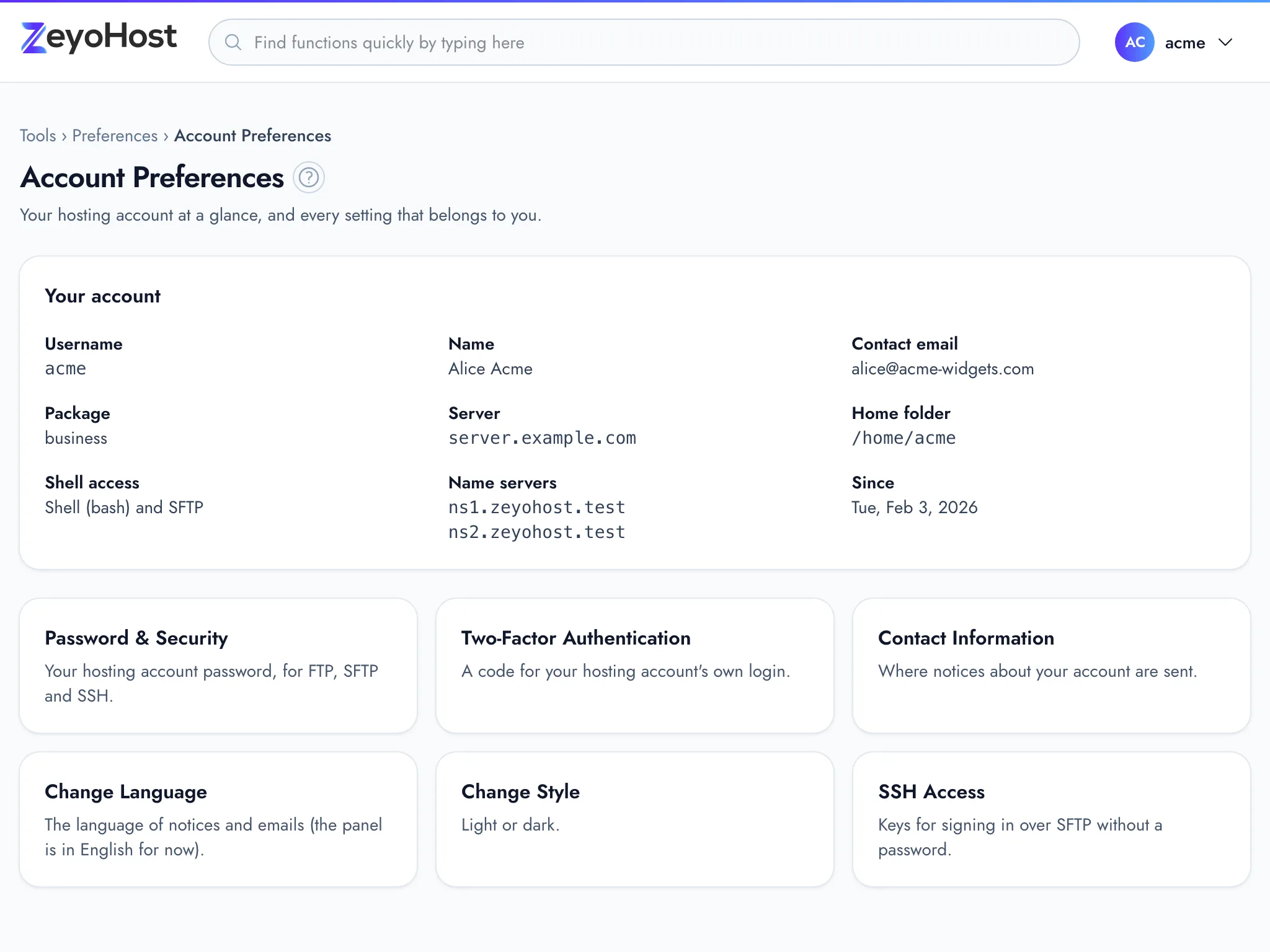
| Detail | What it is |
|---|---|
| Username | The hosting account's username. It names your files and databases. |
| Name | The name on the hosting account, if one is set. |
| Contact email | Where notices about the hosting account are sent. Change it in Contact Information. |
| Package | The hosting package your plan uses. |
| Server | The server the hosting account runs on. |
| Home folder | The folder that holds everything in the hosting account. |
| Shell access | "SFTP only", or "Shell" with the shell's name "and SFTP" when shell access is on. |
| Name servers | The name servers for domains whose DNS is hosted with us. See Point your domain to Zeyo Host. |
| Since | The date the hosting account was created. |
If you own more than one hosting account, these details are for the one selected in your user menu. Switch accounts there to see another.
Open a preference page
Below the details, one card leads to each page:
| Card | Where it goes |
|---|---|
| Password & Security | Your hosting account password, for FTP, SFTP and SSH. See Password & Security. |
| Two-Factor Authentication | A code for your hosting account's own login, not the panel sign-in. See Two-Factor Authentication. |
| Contact Information | Where notices about your account are sent. See Contact Information. |
| Change Language | The language of notices and emails; the panel is in English for now. See Change Language. |
| Change Style | Light or dark. See Change Style. |
| SSH Access | Keys for signing in over SFTP without a password. See SSH Access. |
This page only shows information; it has no settings of its own to change.
Related
- Password & SecurityChange your hosting account's password, the one for FTP, SFTP and SSH, which is separate from your panel sign-in.
- Contact InformationChoose the email address where notices about your hosting account are sent, such as quota warnings and cron output.
- Two-Factor AuthenticationTurn on a 6-digit code from an authenticator app for sign-ins with your hosting account's username and password.
- SSH AccessAdd and remove the SSH public keys that let you log in to your hosting account without a password.
- Accounts, hosting accounts and team membersHow your Zeyo account, your hosting accounts and the people you invite fit together, and which password is for what.
Was this page helpful?
Sent without cookies; we do not store your IP address.
Still stuck? Contact the team; tell us the page and what you see.